Batch Import Proxies
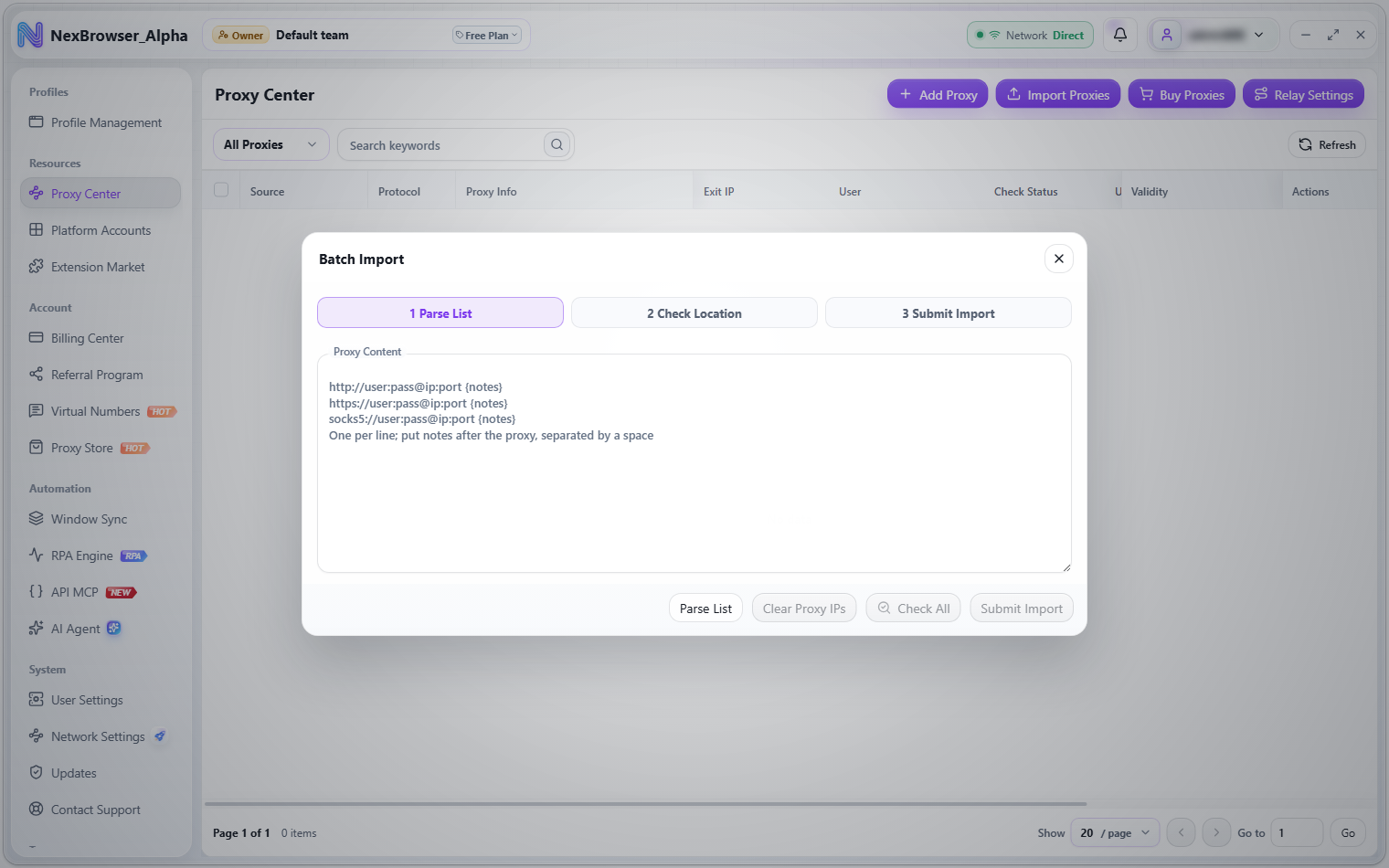
Batch import lets you paste text to add many proxies at once. The top of the dialog shows the flow: 1 Parse List / 2 Check Location / 3 Submit Import. Open it from Resources → Proxy Center → "Import Proxies".
Importing requires the proxy edit permission, which the team owner assigns under "Manage Roles". Without it, the button is greyed out with the tooltip "No permission to import proxies". See Roles and Permissions.
Steps
- In the "Batch Import" dialog, paste your proxies into the "Proxy Content" box, one per line. The placeholder shows examples:
http://user:pass@ip:port {notes},https://user:pass@ip:port {notes},socks5://user:pass@ip:port {notes}. - Click "Parse List". A "Parsed Proxy IPs (N)" preview table appears with the columns Protocol Type, Proxy, Username, Password, Exit IP, Location, Notes, and Check Status. Click "Clear Proxy IPs" to empty the input and preview and start over.
- (Optional) Click "Check All" to check the exit of every row. When it finishes you see "Batch proxy check complete", or "Proxy check complete: N succeeded, M failed" if some failed.
- Click "Submit Import". On success you see "Proxies imported" and the proxies appear in the Proxy Center list.
Supported formats
Only HTTP, HTTPS, and SOCKS5 are supported.
| Format | Example | Notes |
|---|---|---|
| Full URL | socks5://user:pass@ip:port | http://, https://, and socks5:// prefixes are supported |
| No protocol prefix | user:pass@ip:port | Treated as SOCKS5 |
| Credentials first | user:pass@host:port | Username and password before the @ |
| Credentials last | host:port:user:pass | Host and port first, then credentials, separated by colons |
| IPv6 address | [addr]:port | Wrap IPv6 addresses in square brackets |
| Trailing notes | ip:port {notes} | Put notes at the end of the line after a space, or wrap them in braces |
Each line is validated when you parse. A line is invalid if its protocol isn't HTTP / HTTPS / SOCKS5, it has no host, or its port isn't a number from 1 to 65535. If there are any invalid lines, no preview is generated and you see "Fix the N invalid proxies before continuing". Correct or remove those lines, then click "Parse List" again.
Parsing removes duplicates based on protocol + host + port + username + password (protocol and host are not case-sensitive) and shows "Removed N duplicate proxies". If there's nothing to parse, you see "No proxies to import".
Check location (optional)
"Check All" checks every parsed row and automatically retries a failed row once. If you haven't clicked "Parse List" yet, it parses first; if the box is empty you see "Enter proxy content first". For how checks work and the latency colors, see Proxy Check.
You can click "Submit Import" without checking. After importing, you can check single proxies or a selection in the Proxy Center at any time.
What you submit must match the current text box. If you change the text (including notes) after parsing, "Submit Import" becomes unavailable — just click "Parse List" again.