Preference Settings
"Preferences" is the second tab of the create/edit profile dialog. It controls the profile's startup behavior, data sync scope, startup cleanup, and risk protection. "Data Sync" determines which data is uploaded to the cloud, which is key to using a profile across devices.
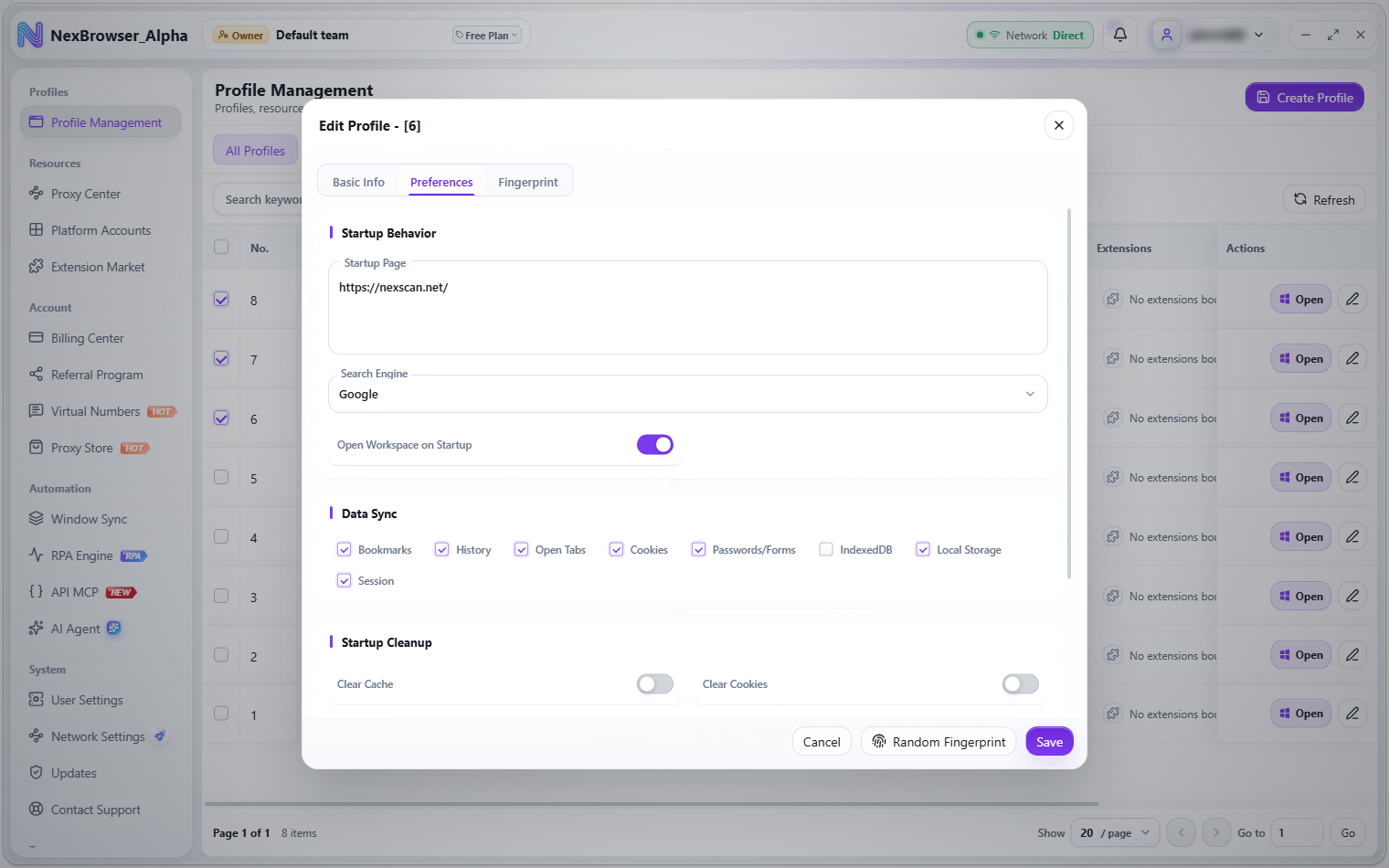
Startup Behavior
| Field | Description | Default |
|---|---|---|
| Startup Page | Multi-line text; the page addresses opened when the profile starts | https://nexscan.net/ |
| Search Engine | Google / Bing / Baidu | |
| Open Workspace on Startup | Toggle | On |
Data Sync
Each checkbox under "Data Sync" means two sides of the same thing: upload this type of data to the cloud when the profile closes, and restore it from the cloud the next time it starts. Checked items are included in sync; if you uncheck everything, nothing is uploaded on exit.
| Checkbox | What's synced | Default |
|---|---|---|
| Bookmarks | Browser bookmarks | On |
| History | Browsing history | On |
| Open Tabs | Tabs open at close, restored on next launch | On |
| Cookies | Website cookies | On |
| Passwords/Forms | Passwords and form data saved by the browser | On |
| IndexedDB | Website IndexedDB databases | Off |
| Local Storage | Website local storage | On |
| Session | Session data | On |
NexBrowser has no manual cookie import or export. Cookies are saved to and restored from the cloud entirely through the "Cookies" checkbox here, automatically when the profile closes and starts. Cloud sync is the only way to move cookies across devices; see Opening, Closing, and Cloud Sync.
"Passwords/Forms" here syncs the passwords and form data saved by the browser itself. Passwords saved through the built-in password extension inside a profile belong to the local password vault and aren't cloud-synced. See Password Vault.
Startup Cleanup
Clears the selected local data before the profile starts. All three options are off by default.
| Option | Description | Default |
|---|---|---|
| Clear Cache | Clears the cache before startup | Off |
| Clear Cookies | Clears cookies before startup | Off |
| Clear Local Storage | Clears local storage before startup | Off |
Risk Protection
| Option | Description | Default |
|---|---|---|
| IP Location Protection | When on, shows a risk alert if the exit country changes | Off |
| IP Change Notification | Notifies you when the exit IP changes | Off |
When triggered, a "Risk Protection Alert" appears at the top of the client, for example "IP location changed (A→B). Check the proxy exit." or "IP changed (A→B)".
As the in-app help explains, an IP location change only triggers a reminder and won't close the profile. Turning it on helps you spot proxy exit drift quickly, but whether to stop working is up to you.